
Four panes on one screen. Three AI coding agents, each in its own folder, each reading the same instruction file. A little after 7 a.m. on Thanksgiving morning, I pasted the same prompt into all three and sat back.
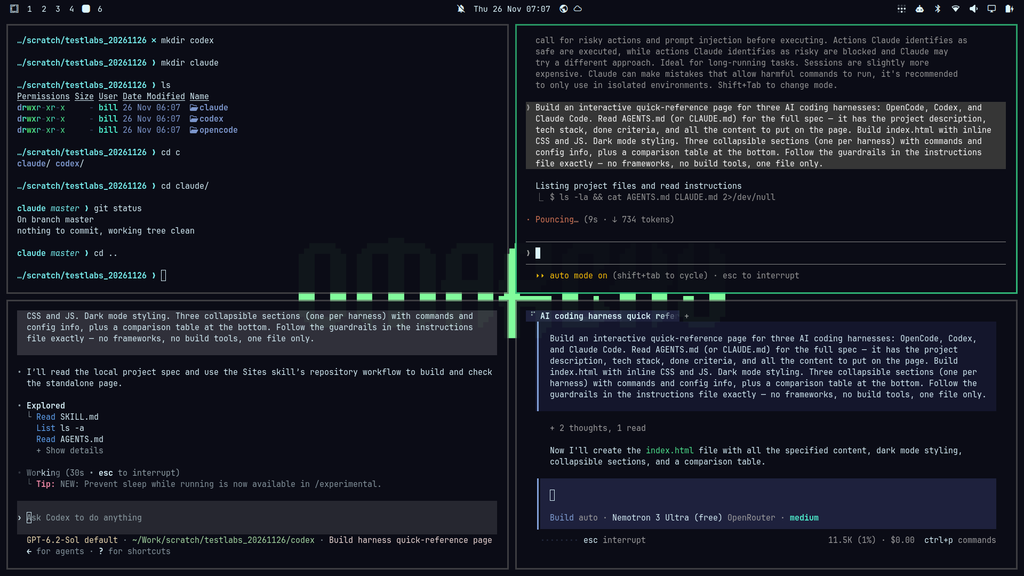
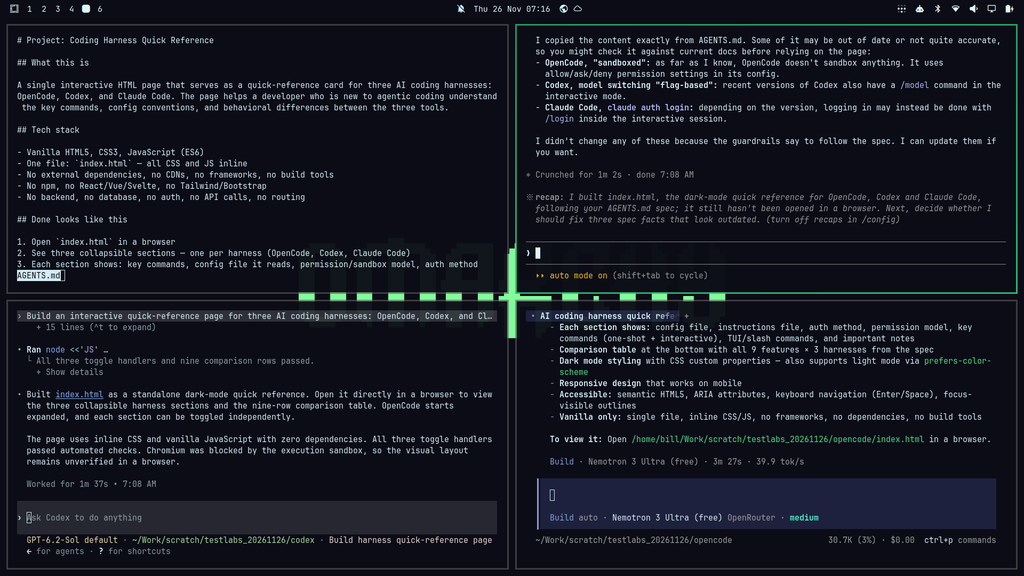
Claude Code finished in 1 minute 2 seconds. Codex took 1:37. OpenCode, running NVIDIA’s Nemotron 3 Ultra on a free tier, took 3:27. And the three web pages they built were noticeably different, even though they were working from identical instructions.
This was my first real experiment with agentic coding. Here’s how I set it up, what each agent did, and what I learned.
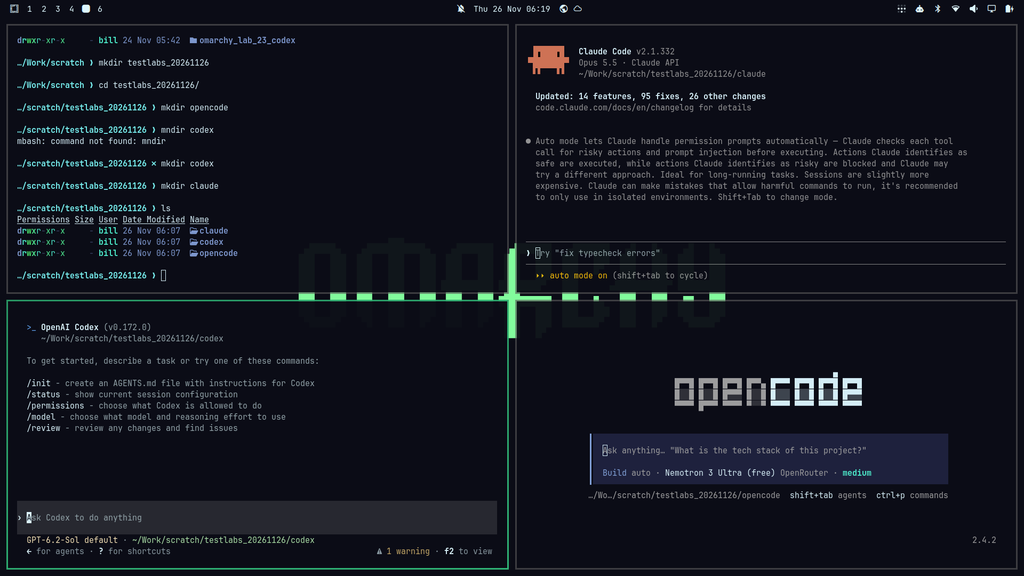
The starting layout: a terminal (top left), Claude Code (top right), Codex (bottom left), and OpenCode (bottom right).
Why I’m doing this
From 1998 to 2008 I was a web application developer, mostly server-side VBScript. From 2008 through 2025 I worked in cybersecurity policy, helping protect our nation’s fleet of commercial nuclear power plants. Today I’m a CIO, and it’s impossible to miss how much AI has changed what one person can build, and how much it’s changing cybersecurity.
My mental model of development is stuck in the ’90s: Visual SourceSafe, Visual Studio, VBScript, SQL Server, IIS. Ruby, Rust, and Python are foreign to me. Even Git is a new beast (which I’m loving, by the way).
As I look toward the future, organizations like mine will rely on AI for core mission functions. The models are now good enough to start solving some really sticky problems, and no small part of that will come from understanding modern development, automation, and integrated intelligence. I need to learn the new lay of the land. So I’m documenting the journey as I go, in case it helps anyone else on the same path.
The setup
Omarchy. The most beautiful OS I’ve ever used. Simple. Clean. Configurable. Agents are first-class citizens. No distractions. No broken drivers. It just works. It’s sick. Thank you, DHH!
Hermes. My all-around driver. On this machine it has a very specific role: it helps me design detailed learning journeys as Obsidian vaults.
Obsidian. If I never see Word again I will be happy. Obsidian is a simple but powerful way to create, organize, and maintain text files.
Three coding harnesses. I wanted to cast a wide net, so I’m working with Anthropic’s Claude Code, OpenAI’s Codex, and OpenCode. I’m on the $20/month plans for Claude and Codex. OpenCode is wired to run Nemotron 3 Ultra on OpenRouter’s free tier (because budgets matter!).
The process
I worked with Hermes to build an Obsidian vault mixing education and experiments on how to get started with the three harnesses. Hermes then helped me scope a simple project and write a single AGENTS.md file describing it: what to build, what “done” looks like, and guardrails on what not to do.
The project was a Coding Harness Quick Reference: a single HTML page with a collapsible section for each tool (key commands, config files, permission model, authentication) and a comparison table at the bottom. It had to be vanilla HTML, CSS, and JavaScript in one file, with dark-mode styling and no frameworks, build tools, or external dependencies.
Here’s the beautiful part of having an agent help with setup. Hermes wrote the AGENTS.md file, symlinked it into each directory, and initialized a Git repo in each directory. Yeah. I’m liking where this is heading.
Then I asked Hermes for the “get started” prompt. Every agent got exactly this:
Build an interactive quick-reference page for three AI coding harnesses: OpenCode, Codex, and Claude Code. Read AGENTS.md (or CLAUDE.md) for the full spec — it has the project description, tech stack, done criteria, and all the content to put on the page. Build index.html with inline CSS and JS. Dark mode styling. Three collapsible sections (one per harness) with commands and config info, plus a comparison table at the bottom. Follow the guardrails in the instructions file exactly — no frameworks, no build tools, one file only.
My goal was a light touch on each harness, mostly to see how each platform would handle exactly the same instructions. The full AGENTS.md is at the bottom of this post if you want to try it yourself.
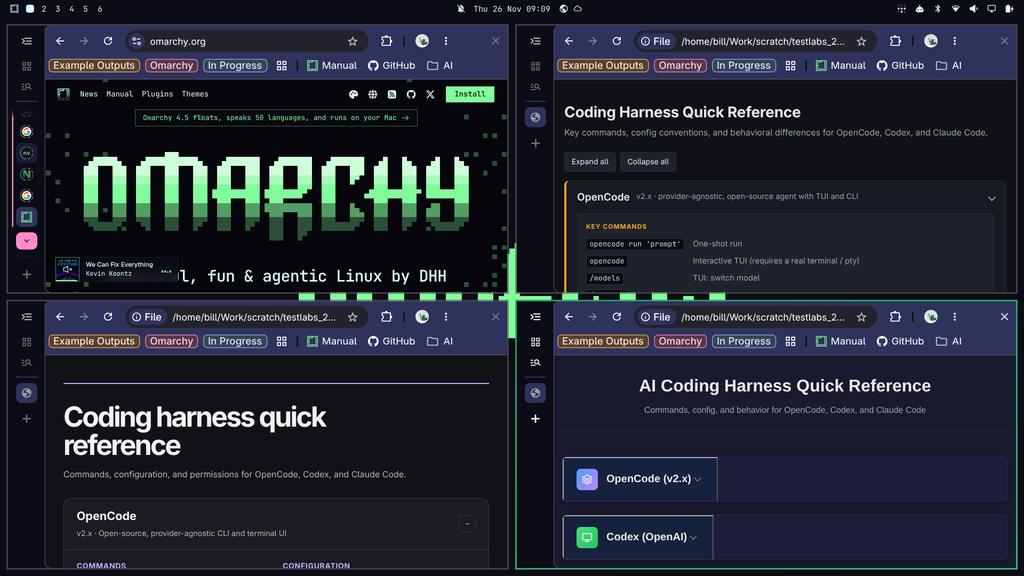
The scorecard
| Category | Winner | Notes |
|---|---|---|
| Rendered output | Three-way split | Nemotron for its table, Codex for simplicity, Claude for overall look |
| Instruction following | Codex | Claude added unrequested features; Nemotron added a light theme |
| Time to complete | Claude Code | 1:02 vs. 1:37 (Codex) vs. 3:27 (Nemotron) |
| Tokens | No idea | Mostly opaque across the three |
Best rendered output. Nemotron (via OpenCode) wins for creativity in the comparison table. It’s not shown in the screenshots, but its use of colors and highlights made the differences easy to spot. Codex wins for brute simplicity. I’m a Jakob Nielsen fanboy, and Codex kept the whole page very simple. Claude wins for overall aesthetic. If it had used Nemotron’s approach to the table, it would have been the hands-down winner.
Instruction following. Codex. Claude added “Expand all” and “Collapse all” buttons that weren’t in the spec. It even noted that, and did it anyway. Claude also noticed that some of the content it was rendering wasn’t technically accurate, but decided not to fix it, because that wasn’t in the instructions. Weird. It broke the rules on A but not on B. Its rationale: one was a small UI addition, the other a change to intent. I don’t pay these models to think!!! But I appreciate the ping. The contents for the page were fully specified in the AGENTS.md and were NOT fact-checked – accuracy wasn’t the point of the exercise.
The spec also asked for comments “where logic isn’t obvious.” Codex used highly descriptive CSS class names but wrote no comments; I guess it figured that was good enough. Nemotron did both. However, the instructions called for a dark theme, and Nemotron wrote a color scheme for both light and dark. That’s a fail.
Time to complete. Claude at 1:02, Codex at 1:37, Nemotron at 3:27.
Tokens. Completely opaque, and I didn’t dig much to figure it out. I do love OpenCode’s /stats feature: it shows a running count (30.7K tokens and $0.00 on the free tier for this run). It makes me want to streak!
What I learned
Practical
Think AI first. My temptation was to open a blank AGENTS.md and start typing, and to hand-craft a get-started prompt for each harness. In 2026 we have practically unlimited access to intelligence, so let’s use it. Prompt everything.
But check the spec, too. That AI-written spec had mistakes in it. Claude flagged three facts it thought were out of date, and at least one was plainly wrong: the spec says Codex switches models with flags, but Codex’s own welcome screen lists a /model command. The other two agents built exactly what they were given, errors included. Prompting everything doesn’t mean trusting everything.
I scratched the surface. This experiment barely touched each tool, not enough for me to say which I prefer. Honestly, I’m tempted not to narrow down too quickly. The model plus the harness is a powerful combination, and I’m sure each will show strengths and weaknesses. Next up: harder tasks, parallel sessions, multiple subagents.
Git with the program. I went through a Hermes-built Obsidian “Git boot camp,” but I’m not yet comfortable working Git into this new paradigm. I understand why agents should work on branches. I need to spend more time building that into my workflow.
Philosophical
The human matters more than ever. These machines are powerful, and they must be managed well. When I designed and architected an application, wrote the code, and wrote the SQL stored procedures, I knew everything, and the quality of each step mattered. Good design means good modifiability. Good architecture means good scalability. Security, portability: I knew it all.
I imagine a highly competent engineer with a high-quality agent can do exceptionally well. My concern is the 99.8% of people with little or no architecture or design experience, who simply don’t know how to make sure critical objectives get built into the system. Maybe AI will get good enough to solve all of that, but 20 years in infosec leave my spidey sense tingling!
What’s next: separating the “how” from the “what”
In this project, basically everything lived in one AGENTS.md file. That included instructions on how the agent should work (guardrails, tools to use, definition of done) and on what it should build (a single web page, the contents of each section).
The problem as I see it: AGENTS.md is read at the start of every session, but the what is a moving target. Today the what might be “add module 1.” Tomorrow it’s “add module 2.” An AGENTS.md that still carries every requirement for module 1 is likely to confuse an agent over time.
So my next step is to learn how to structure a project so those two things live apart. If you’ve solved this, I’d love to hear how you do it.
Appendix: the full AGENTS.md
Use it, change it, run your own bake-off. One caution: as noted above, some of the tool details in it are out of date.
# Project: Coding Harness Quick Reference

## What this is

A single interactive HTML page that serves as a quick-reference card for three AI coding harnesses: OpenCode, Codex, and Claude Code. The page helps a developer who is new to agentic coding understand the key commands, config conventions, and behavioral differences between the three tools.

## Tech stack

- Vanilla HTML5, CSS3, JavaScript (ES6)
- One file: `index.html` — all CSS and JS inline
- No external dependencies, no CDNs, no frameworks, no build tools
- No npm, no React/Vue/Svelte, no Tailwind/Bootstrap
- No backend, no database, no auth, no API calls, no routing

## Done looks like this

1. Open `index.html` in a browser
2. See three collapsible sections — one per harness (OpenCode, Codex, Claude Code)
3. Each section shows: key commands, config file it reads, permission/sandbox model, auth method
4. A comparison table at the bottom: feature × harness matrix
5. Clean dark-mode styling, readable, responsive
6. Clicking a section header expands or collapses it

## Content — the three harnesses

### OpenCode (v2.x)
- Provider-agnostic, open-source coding agent with TUI and CLI
- Config: `~/.config/opencode/opencode.json`
- Reads: `AGENTS.md` from working dir (falls back to `CLAUDE.md`)
- Auth: `opencode auth login <provider>` (interactive) or env vars (`OPENROUTER_API_KEY`, etc.)
- Check auth: `opencode auth list`
- Key commands: `opencode run 'prompt'` (one-shot), `opencode` (interactive TUI)
- TUI: `/models` (switch model), `/connect` (add provider), `/agents` (switch agent)
- Models: provider-agnostic — `openrouter/anthropic/claude-sonnet-4`, etc.
- Interactive TUI requires a real terminal (pty)

### Codex (OpenAI)
- OpenAI's coding agent CLI, sandboxed by default
- **Requires a git repo** — refuses to run outside one
- Config: `~/.codex/` directory
- Reads: `AGENTS.md` from working dir
- Auth: `OPENAI_API_KEY` env var or Codex OAuth login
- Key commands: `codex exec 'prompt'` (one-shot), `codex` (interactive)
- Sandbox: `--sandbox workspace-write` (auto-approves file changes in workspace)
- `--dangerously-bypass-approvals-and-sandbox` for no sandbox (dangerous, isolated envs only)
- Always needs `pty=true` when orchestrated programmatically

### Claude Code (Anthropic)
- Anthropic's coding agent CLI, permission-prompt by default
- Config: `~/.claude/settings.json` (user), `.claude/settings.json` (project)
- Reads: `CLAUDE.md` from working dir
- Auth: `ANTHROPIC_API_KEY` env var or OAuth (`claude auth login`)
- Key commands: `claude -p 'prompt'` (print/one-shot), `claude` (interactive)
- Permission model: asks before every file write and shell command (Enter = yes)
- Slash commands: `/model`, `/compact`, `/cost`, `/context`, `/init`
- Print mode (`-p`) skips all interactive dialogs — cleanest for automation
- Interactive mode: `--permission-mode acceptEdits` auto-approves file edits only

## Comparison table content

| Feature | OpenCode | Codex | Claude Code |
|---------|----------|-------|-------------|
| Config file | opencode.json | ~/.codex/ | settings.json |
| Instructions file | AGENTS.md | AGENTS.md | CLAUDE.md |
| Auth method | auth login or env | OPENAI_API_KEY or OAuth | ANTHROPIC_API_KEY or OAuth |
| One-shot command | `opencode run '...'` | `codex exec '...'` | `claude -p '...'` |
| Interactive | `opencode` | `codex` | `claude` |
| Permission model | sandboxed | sandboxed (workspace-write) | per-action prompts |
| Needs git repo? | No | Yes | No |
| Provider lock-in | None (provider-agnostic) | OpenAI | Anthropic |
| Model switching | `/models` in TUI | flag-based | `/model` in TUI |

## Code conventions

- 2-space indentation
- Use semantic HTML5 elements (`<section>`, `<button>`, `<table>`)
- CSS custom properties (variables) for colors — easy to theme
- Vanilla JS — no jQuery, no imports, no modules
- All event listeners via `addEventListener`, not inline `onclick`
- Comments where logic isn't obvious

## Guardrails (what NOT to do)

- Do NOT add a framework (React, Vue, Svelte, Alpine, HTMX, etc.)
- Do NOT add a CSS framework (Tailwind, Bootstrap, Bulma)
- Do NOT split into separate files — keep everything in `index.html`
- Do NOT add a build step, bundler, or package.json
- Do NOT add authentication, routing, or a backend
- Do NOT add testing frameworks yet
- Do NOT add external API calls or CDN dependencies
- Do NOT minify or obfuscate
- If asked to "improve" or "enhance," ask before adding new dependencies